DORA Navigator
Regulation (EU) 2022/2554 and everything that completes it — 14 legal acts, 215 articles, 6 themes — as one interactive map you can move around in. A navigation aid for the whole DORA package: which act details which article, what implements what, and where every cross-reference leads.
At its core DORA is a risk regulation — the EU's response to ICT and operational-resilience risk becoming a systemic threat to financial stability. It's best read from a risk perspective, and the six themes here are the fronts on which DORA manages that risk: ICT risk management, incidents, testing, third-party risk, and oversight of the providers everyone depends on.
It runs entirely in your browser — nothing to install, no login, no analytics, and zero third-party requests. Nothing you click leaves your machine.
How to use it
The three views
Switch views from the tabs along the top. Each answers a different question about the same package.
- Network — the whole package as one graph. DORA sits at the centre; the six themes branch out to their acts, and every article hangs off its act. Dashed red lines mark implements relationships. Best for seeing the shape of the whole thing and how densely it cross-references.
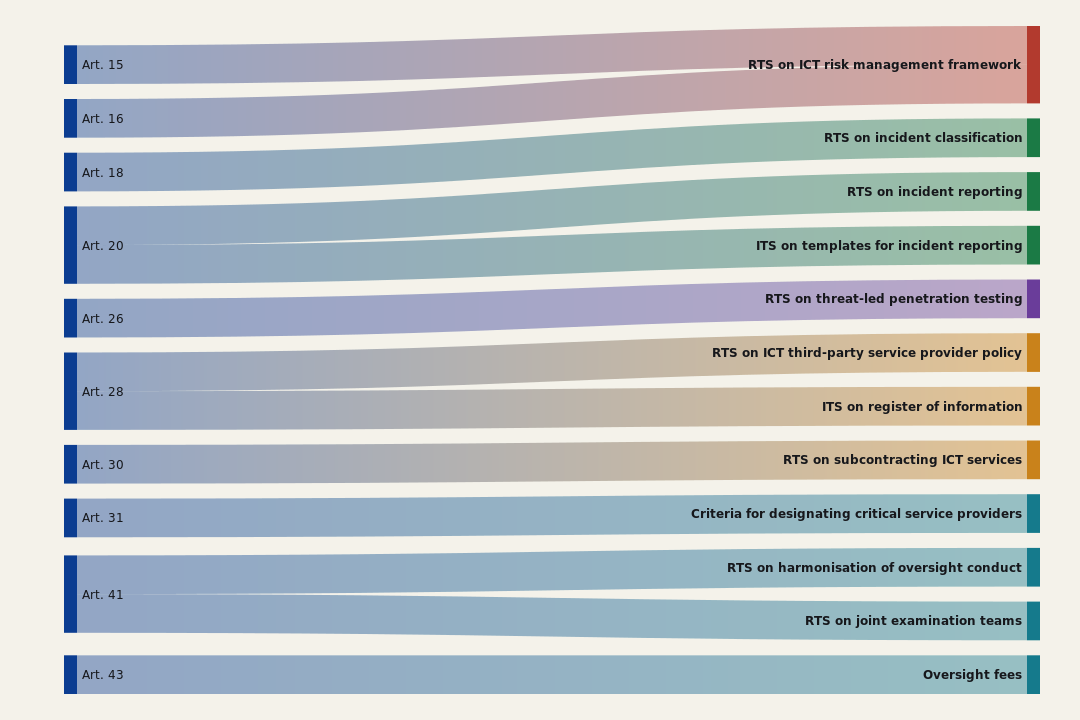
- Implements — a flow diagram answering "who fills in what". Each DORA article on the left connects to the technical standard or delegated act on the right that spells out its detail. The fastest way to find which act to read for a given obligation.
- Treemap — the six themes as sized blocks, each act a labelled rectangle. Bigger rectangle, more articles — so you can see at a glance where the bulk of the rules sit.
The detail panel
Click anything — a node, a wedge, a rectangle, a flow — and the right-hand panel fills in.
- For an act: its type, theme, CELEX number, article and recital counts, which DORA articles it implements, and its full list of articles.
- For an article: its full text, the acts that reference or implement it, and links to the other DORA articles it points to. Every cross-reference is clickable, so you can walk the chain.
Click a category anywhere to see its acts; use ← Back to step up a level.
Search
Type in the search box (top right) to find acts and articles by title, keyword, or CELEX number. Results show a snippet of the matching text; click one to open it in the panel.
Tips
- On the Network view, drag to pan, scroll to zoom, and drag any node to reposition it.
- The panel's opening screen is a package overview: the headline numbers and the six themes with their act and article counts.
Source: the official texts on EUR-Lex. DORA Navigator is a navigation aid, not legal advice — confirm against the primary sources before you rely on anything. The verified set of official texts lives in the DORA resource library.